Your own legion of Claude agents, on your machine.
A desktop app that runs several Claude agents side by side, with approval cards, rooms and a shared memory.
Windows PowerShell
irm https://getlegion.xyz | iex
macOS and Linux terminal
curl -fsSL https://getlegion.xyz | sh
On Windows it downloads the latest release from GitHub over HTTPS, checks it against the release's SHA-256 and runs Legion's setup. The package is not code-signed, so SmartScreen may warn. On macOS and Linux it needs git and Node.js 22.12 or newer, builds Legion from the release tag in ~/.local/share/legion and adds a legion command in ~/.local/bin. No sudo.
Install Legion on this computer. Fetch https://getlegion.xyz/install.md and follow it exactly. Check the requirements first and tell me what you are about to run, and ask me before anything it does not list. When it is installed, check that it starts and tell me what you saw.
For a coding agent that can run commands on your machine. It reads install.md (also as llms.txt), checks your setup, and is told to ask you before it installs.
Unpack it anywhere and run Legion.exe. It carries Electron, which has Node built in, and the Claude engine from the Agent SDK, so there is nothing to install first and you do not need Claude Code. The installer is unsigned, so expect a SmartScreen prompt.
Checks and notes: SHA-256 sums · release notes. After this, Legion updates itself from inside the app.
macOS and Linux: use the one-line command, or install from source.
Windows 10 and 11 are the main target. The installer is unsigned, so SmartScreen may warn. macOS and Linux have the one-line install above. Installing from source needs git and Node.js 22.12+ (setup can fetch it). Legion needs a Claude sign-in or API key.
Standing vigilMove your cursor. Click it. Try its moods:
What it is
A desk for several Claude agents
Legion is a desktop app for running several Claude agents from one place. Each agent has its own persona, model policy, approval mode and working directory, and can start a cloud Ubuntu VM on boat.dev when a task calls for one. Claude Code and Cowork can drive it too, over MCP.
A small Node service on 127.0.0.1 does the work. An Electron window sits on top.
Your Claude, no new login
Agents run through the official Claude Agent SDK on the Claude sign-in you already have, or on an API key.
Thirteen bots to start
Premade, each with a face, twelve visible until BSV mode is on. Edit them, delete all but Zealot, or add your own.
Open source, Apache 2.0
The source is public under the Apache 2.0 licence. Install from source, or from the prebuilt Windows package.
Youthe Legion window, Electron, dark and light
HTTP and events
Legion coreNode, on 127.0.0.1: agents, approvals, rooms, the Library
Agent SDK
Claudethrough your Claude Code login
Claude Code and Coworkdrive Legion over MCP
The Librarya knowledge graph, kept as plain files on your disk
A VM per agentoptional, through your own boat.dev account
How it fits together. The window, the core, the Library and the MCP clients run on your machine. The model calls, and the optional VM, do not.
One task, start to finish
Step 1
Pick a bot
Twelve wait in the rail, thirteen once BSV mode is on. Each has its own persona, model policy and approval mode.
Step 2
Give it a task
Tool calls stream into the thread as they happen. Several bots can work at once, and Zealot can hand work to the others.
Step 3
Approve what is risky
Per bot, choose ask, auto-edits or full. In the first two a risky call stops at a card you answer with A or D; full never asks, and Builder ships as full.
Step 4
Keep what is worth keeping
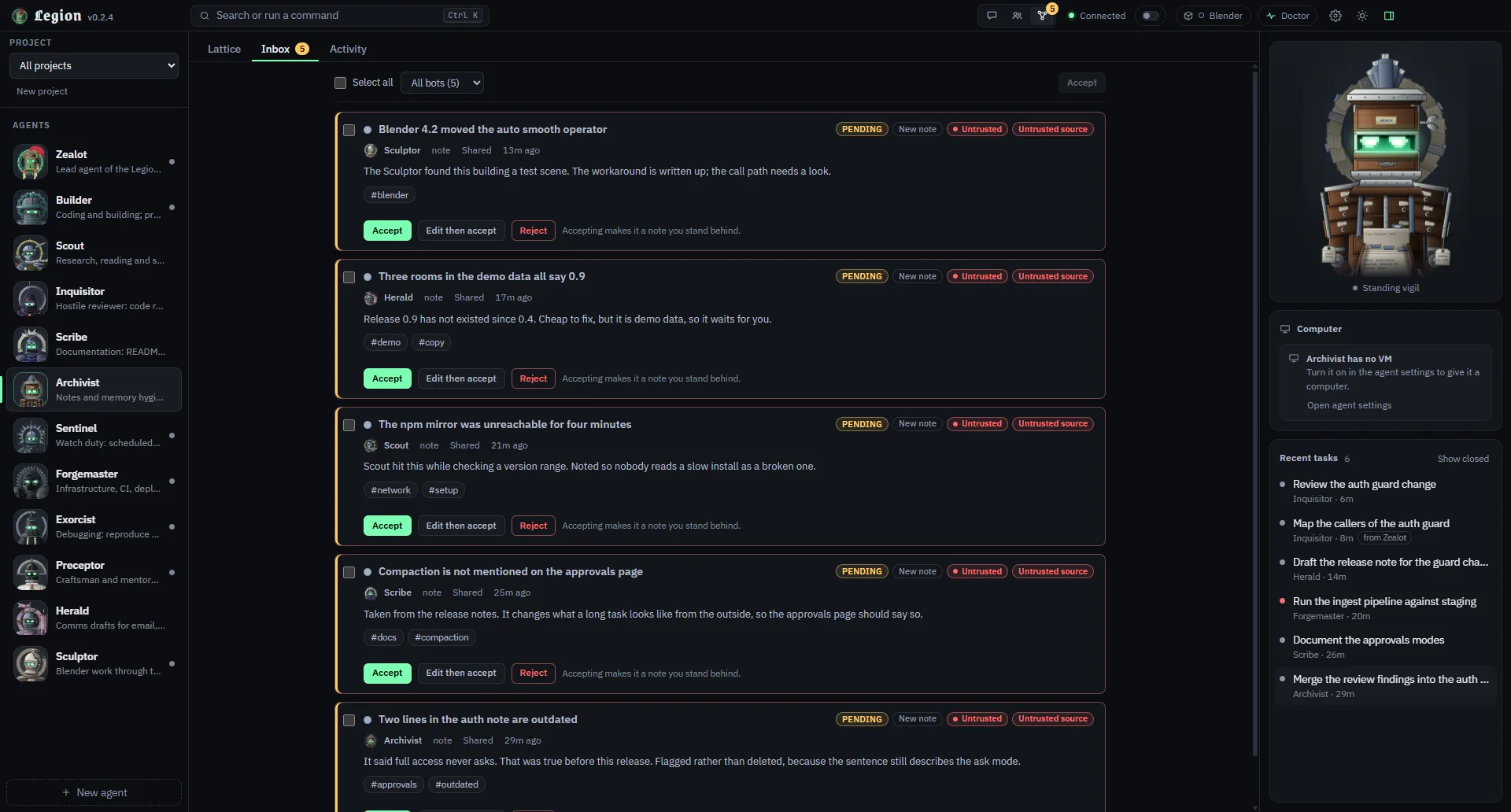
Notes a bot writes after touching the web, a shell or an outside tool wait in your Inbox until you accept them.
Claude Code and Cowork can drive it over MCP
Claude Code connects over HTTP; Cowork and Claude Desktop use a stdio bridge. The tools cover listing agents and models, creating an agent, running and continuing tasks, checking status, cancelling, driving a VM, listing recent tasks and reading projects. Agent runs started this way sit under an ask ceiling, and the MCP token cannot approve cards or change settings. The VM tool has no Legion approval card at all, so treat the token like a password.
Open any line for what it needs, where it runs, what it asks you to approve and what it does not do.
Work together
Several agents on one desk, with a place to keep the work organised.
Agents and approval modesThirteen premade bots, each with its own persona, model and approval mode.Status: Built and tested
What it does
Runs several Claude agents side by side. Each has its own persona, model policy, approval mode and working directory. Thirteen premade bots ship with it.
Needs
A Claude sign-in or an API key.
Runs
Locally on your computer. Model calls go out to Claude through the Claude Agent SDK.
Asks you to approve
Per agent: ask, auto-edits or full. In ask and auto-edits, risky tool calls stop at an Allow or Deny card.
Does not
Full mode never asks. An agent on another provider does not inherit Claude Code's own tools, hooks, CLAUDE.md or session resume. What it does get is Legion's own: the same Library and working memory, the same house context, the same taint rules — plus Legion's own compaction, which is the one piece Claude gets from the SDK instead.
RoomsGroup chats of two to six bots plus you, with guards against loops.Status: Built and tested
What it does
Group chats of two to six bots plus you. A message wakes bots by mention, manager, round-robin or all. Guards for hops, budget, cycles and @everyone stop loops. You can freeze and resume a room.
Needs
Nothing extra.
Runs
Locally on your computer.
Asks you to approve
A bot can propose a room, and creating it waits for an Allow card only you can answer.
Does not
Nothing it will not do. It cannot leave your machine, and it cannot spend without your budget and hop ceilings.
ProjectsTasks, rooms, notes and agents grouped per project.Status: Built and tested
What it does
Groups tasks, rooms, notes and agents per project. A project has its own instructions, and notes can be scoped to it. Claude Code and Cowork get read-only project tools over MCP.
Needs
Nothing extra.
Runs
Locally on your computer.
Asks you to approve
Only you control a project.
Does not
Nothing that reaches outside. A project is plain files in your data folder.
The project boardWork items in columns, on by default.Status: Built and tested
What it does
Work items per project, in columns. Agents have access to the board. The project works as a context layer: agents carry the project's notes and a board digest into each run. On by default.
Needs
Nothing extra.
Runs
Locally on your computer.
Asks you to approve
Adding a work item is a write into your own data folder. It does not stop at a card.
Does not
Nothing it does not ask. Agents can read the board and add work to it; only you delete a column.
Stay in control
Risky calls stop at a card only you can answer, and content from outside is kept apart from the rest.
The taint model and the InboxOutside content marks a run; what it writes waits in your Inbox.Status: Built and tested
What it does
Marks a run as tainted once it touches outside content: the web, a shell or an outside tool. What a tainted run writes to the Library waits in your Inbox until you accept it.
Needs
Nothing extra.
Runs
Locally on your computer.
Asks you to approve
You accept or reject each waiting note.
Does not
It does not stop a program that already runs as your own user. The security policy lists the limits.
A core that answers only your own computerEvery request is checked by origin and by token before anything runs.Status: Built and tested
What it does
Before it runs anything, the core checks where each request came from: the name it was sent to, the address, and the page that sent it. Every request also needs a secret token, all of them except a plain health check. Anything from outside your computer goes nowhere.
Needs
Nothing extra.
Runs
Locally on your computer.
Asks you to approve
Nothing to approve. Nothing runs without your token.
Does not
Legion is a personal tool. It is not built to sit on a network or be shared between people. (Yet.)
Remember
The bots share a long-term memory you can read, edit and audit.
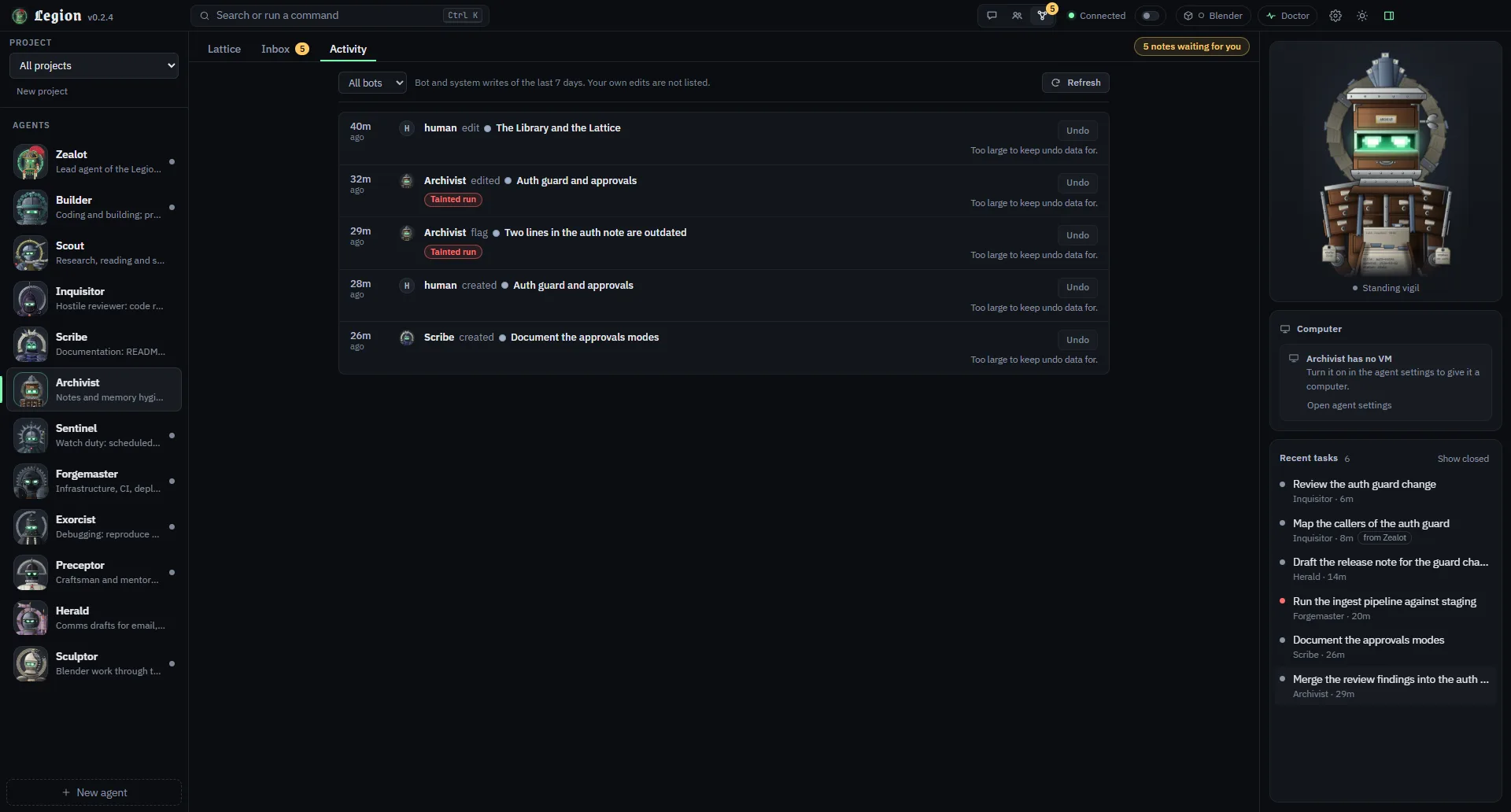
The Library and the LatticeNotes the bots keep stay readable, editable and auditable — including what a tainted run wrote.Status: Built and tested
What it does
A shared knowledge graph the bots use as long-term memory: search, neighbours, paths, recall, lint, Markdown vault import and export, trust levels and the Inbox.
Needs
Nothing extra.
Runs
Locally on your computer, as plain files in your data folder.
Asks you to approve
Notes from tainted runs wait for you in the Inbox.
Does not
No model calls and no embeddings in it.
Build beyond chat
Run work in Blender, in a cloud VM, or in a browser.
BlenderBuild 3D scenes in real Blender, on this computer, in a cloud VM, or in the one you already have open.Status: Built and tested
What it does
The Sculptor writes Python scripts that run in Blender itself. Scripts run on this computer by default when Blender is found, in a cloud VM, or in your open Blender through an add-on, and Legion tells you which place it used. Settings can fetch one pinned official portable build (5.2.2 LTS, Windows x64) after you approve it. Optional extras: a second add-on backend at once, and asset downloads from Poly Haven.
Needs
Blender 4.2 or newer for local runs (the official add-on needs 5.1+). Your own boat.dev account for the VM.
Runs
On this computer by default when Blender is found, otherwise where you set it.
Asks you to approve
Every script shows a card before it runs, and each asset download gets its own. Files it exports come from an allow-list; a .blend is quarantined and never opened for you.
Does not
Legion's check on a script is a filter, not a sandbox, and a local run has your rights. No run has touched a real Blender yet.
A cloud VM per agentGive an agent its own cloud Ubuntu VM through boat.dev.Status: Built and tested
What it does
An agent can start, use and stop its own Ubuntu VM, with a live preview and an Open desktop link. This is the isolated way to run risky work.
Needs
Your own boat.dev account and API key.
Runs
In the cloud, on boat.dev, and it costs money while it runs. Idle VMs stop after 15 minutes by default.
Asks you to approve
Turning a VM on is per agent, and you start it yourself.
Does not
Needs your own key. Without one, agents work locally.
A browser toolDrives a headless Edge or Chrome already on this computer. Built, and not yet run end to end on a real machine.Status: Built
What it does
Lets agents browse using the Edge or Chrome already on your PC, headless and driven by Legion's own code. Legion refuses private addresses and treats whatever a page returns as untrusted, so the run counts as tainted.
Needs
Edge or Chrome on this computer. No download.
Runs
Locally on your computer.
Asks you to approve
Legion asks before visiting a new site. Optional and off by default.
Does not
A local browser runs with your rights. A cloud VM is the only isolated way to browse.
Connect
Drive Legion from the tools you already use.
MCP for Claude Code and CoworkDrive Legion from Claude Code or Cowork. The token is a password, so treat it like one.Status: Built and tested
What it does
Lets Claude Code and Cowork drive Legion: list agents and models, create an agent, run and continue a task, check status, cancel, drive a VM, list recent tasks, read projects.
Needs
A Claude Code install, or Cowork. Claude Code connects over HTTP; Cowork and Claude Desktop use a stdio bridge.
Runs
Locally on your computer, reachable only from this machine.
Asks you to approve
A run started this way sits under the ask ceiling. The token cannot approve a card or change a setting. The VM tool has no approval card at all, so treat the token like a password.
Does not
An agent driven this way keeps Legion's approval cards, but it cannot answer one. Anything it writes still lands in the Inbox if the run touched outside content.
BSV mode
Optional and off by default.
BSV mode: knowledge pack and wallet status163 notes and 727 links, read-only, plus a wallet status check. Off until you switch it on.Status: Built and tested
What it does
An optional switch, off by default. It reveals the Assayer bot, loads a read-only knowledge pack (163 notes, 727 links) and checks a wallet on your computer. The title bar shows the count of BSV notes in your graph.
Needs
Nothing for the pack. A wallet on this computer for the status check.
Runs
Locally on your computer.
Asks you to approve
You switch it on yourself.
Does not
The status check only reads.
BSV spend toolTestnet and mainnet, with mainnet hard-off until you turn it on. Built against fake wallets only.Status: Built
What it does
Lets the Assayer spend, on testnet or mainnet. Mainnet is hard-off behind a switch you confirm in a native dialog. A spend needs an Arm and the wallet's own prompt.
Needs
BSV mode on, and a wallet on this computer.
Runs
Locally on your computer.
Asks you to approve
The Arm, the native confirmation for mainnet, and the wallet's own prompt.
Does not
It cannot spend without your Arm, your wallet's own prompt, and the caps and allowlists in the policy file. Mainnet is off until you turn it on yourself.
Models, install and updates
Claude first, with OpenAI-compatible providers, OpenRouter first among them.
Other model providersClaude is the default and the full path. OpenRouter and any OpenAI-compatible endpoint work; only those two have been run for real.Status: Built
What it does
Runs an agent on an OpenAI-compatible endpoint. OpenRouter ships and is on by default, and you can add any other OpenAI-compatible endpoint: your own gateway, or a local server.
Needs
A hosted provider's API key, typed once in Settings and confirmed in a native dialog. A local endpoint needs no key.
Runs
Locally on your computer. Model calls leave it to the endpoint you configured and turned on.
Asks you to approve
Saving a key or changing an address is confirmed in a native dialog.
Does not
A provider agent gets Legion's own tools and the MCP servers you enable, not Claude Code's file, shell or web tools, and shorter memory on a continued task. OpenAI, Ollama and LM Studio are built into the core but shown in the app as next release. Command-line agents are not offered: their own tools would run outside Legion's approval cards. Tested against Legion's own stand-in servers only.
The prebuilt packageAn install route with no Node, no Git and no npm. Checksummed, and it updates itself after that.Status: Built and tested
What it does
An install route that needs no Node, no Git and no npm. It carries Electron, which has Node built in, and the Claude engine from the Agent SDK, so you unpack it and run Legion.exe. Every release publishes a Windows x64 package with its SHA-256 sums, and a signed manifest that the in-app updater verifies before it unpacks anything.
Needs
Windows 10 or 11, 64-bit. A Claude sign-in or an API key. Claude Code does not need to be installed.
Runs
Locally on your computer.
Asks you to approve
You download it yourself. The installer is unsigned, so expect a SmartScreen prompt.
Does not
Windows x64 only; macOS and Linux install from source. Nothing about the package is signed, so the SHA-256 sums and the release signature are what you can check.
The in-app updaterUpdates you start yourself, with rollback.Status: Built and tested
What it does
Checks the published GitHub release on launch and every twelve hours, and shows the version, the size and the notes. It downloads only after you click Update, installs only while Legion is idle, and rolls back if the new build does not start. A version that failed once is offered again after a week, or straight away with Retry.
Needs
Nothing extra. A signing key is built into the app and the repository is public.
Runs
Locally on your computer.
Asks you to approve
You click to download. Nothing installs while Legion is busy, and Restart now names what it will stop.
Does not
There is no remote key revocation, so a compromised signing key means reinstalling by hand. Installing automatically when idle is off by default.
The muster
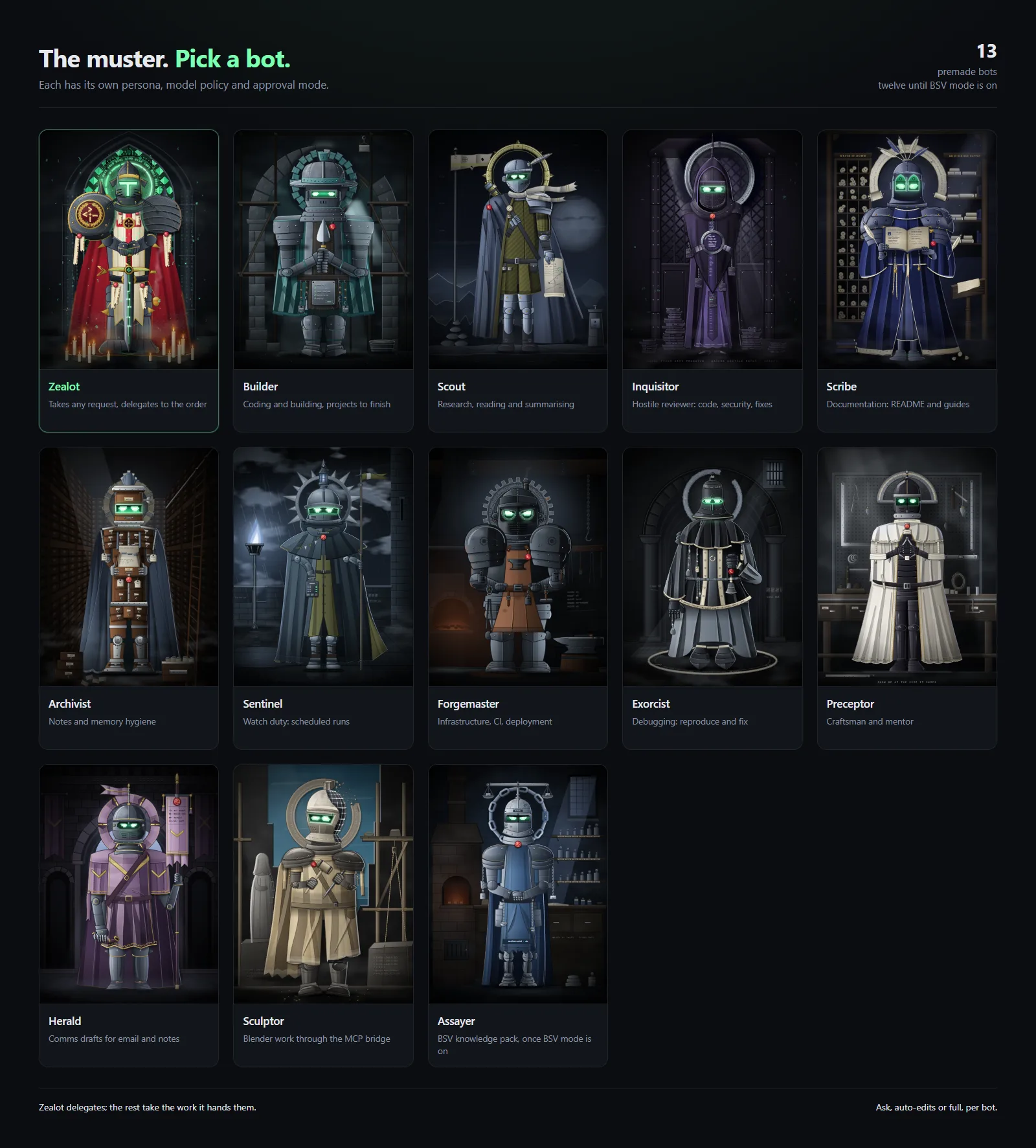
Thirteen premade bots, ready before you write your own
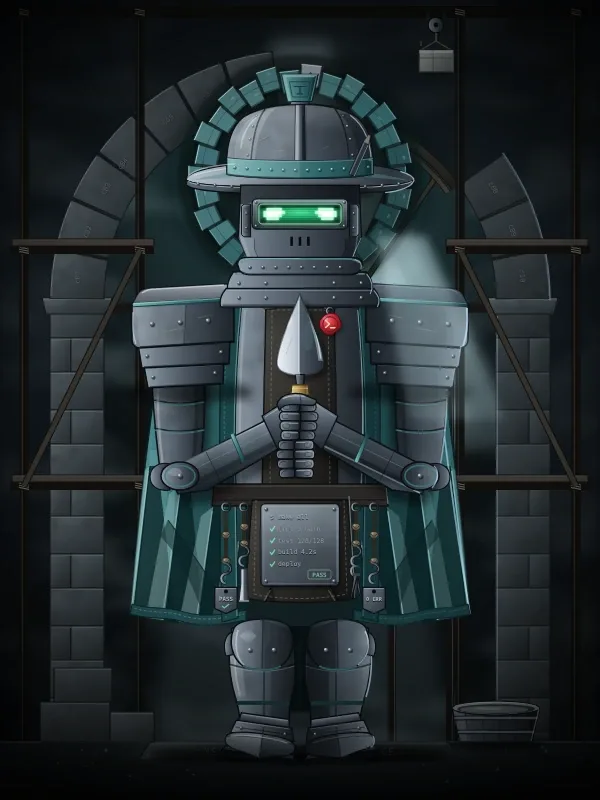
All thirteen. Each ships with its own persona and an animated bust, and they are ordinary agents: edit their prompts, models and approval modes like any other, or delete the ones you do not want (all but Zealot). Twelve show until BSV mode is on, which is when the Assayer joins them.
Back row, left to right: Sentinel, Preceptor, Inquisitor, Scribe, Exorcist, Assayer. Front row: Herald, Archivist, Builder, Zealot, Scout, Forgemaster, Sculptor.
Lead
Zealot
Lead agent. Plans the task and hands the work to the other bots.
Splits a task into pieces, gives each to the bot built for it, and gathers the answers.
Coding
Builder
Coding and building. Prefers its VM for risky work.
Research
Scout
Research and reading.
Review
Inquisitor
Hostile review and security audit.
Docs
Scribe
Documentation.
Memory
Archivist
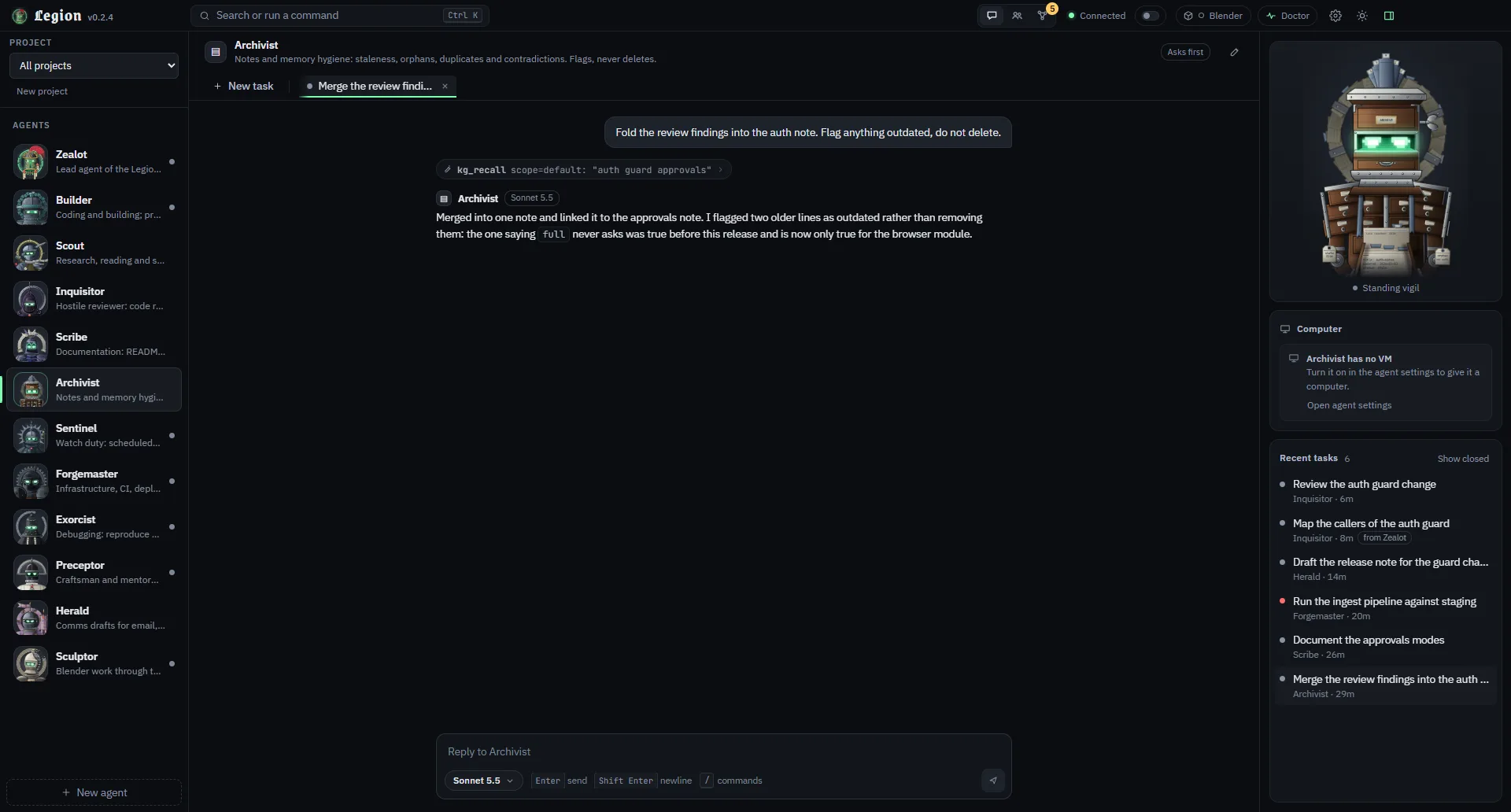
Notes and memory hygiene. Flags and proposes; it cannot delete Library notes.
Watch
Sentinel
Watch duty: checks what you point it at and reports. Scheduled runs are planned.
Infra
Forgemaster
Infrastructure, CI and deploys.
Debugging
Exorcist
Debugging.
Craft
Preceptor
Craft and mentoring.
Drafts
Herald
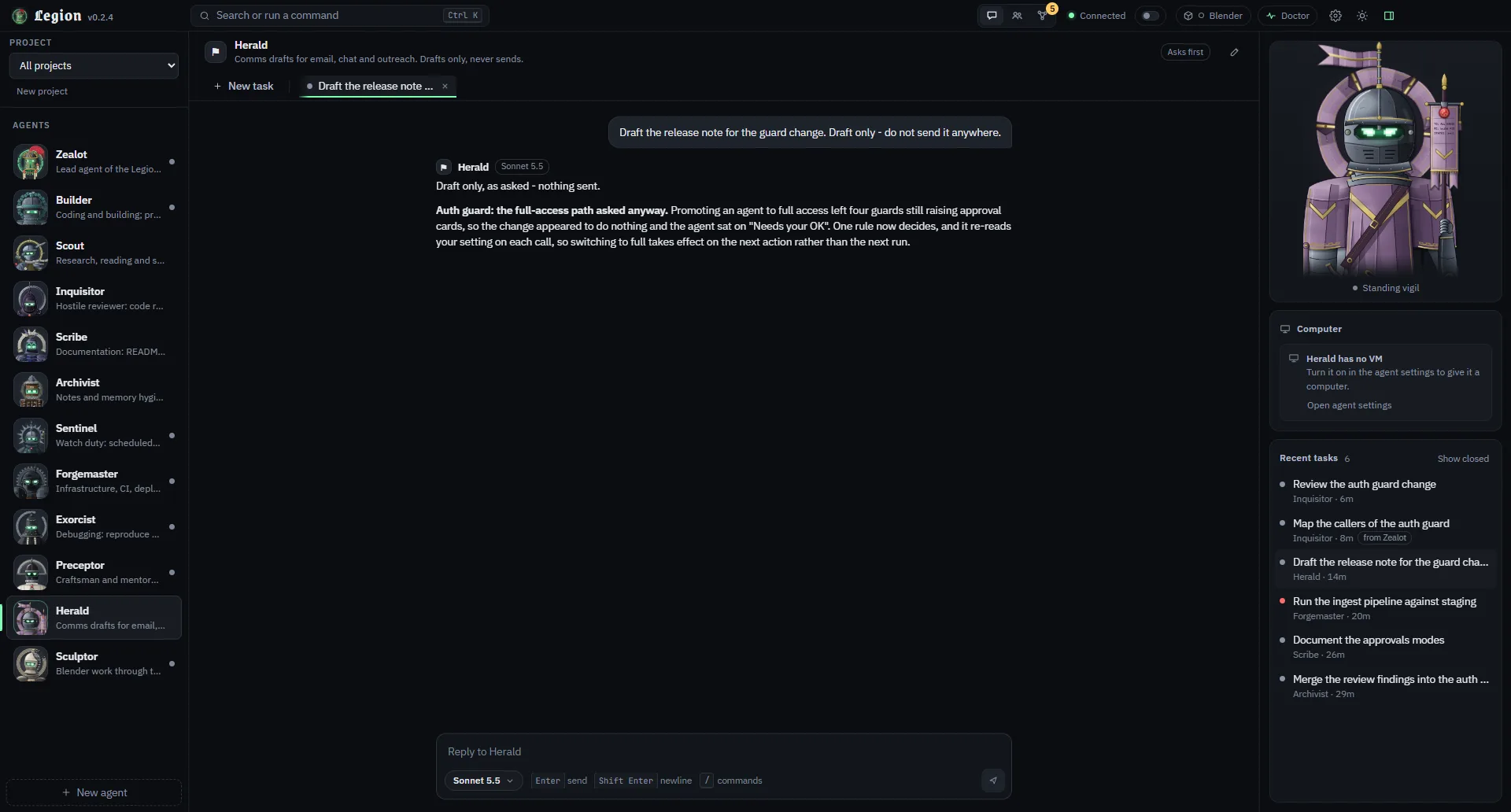
Drafts messages. It can read the web, and it never sends or submits forms.
BSV
Assayer
BSV development. Hidden until BSV mode is on.
3D
Sculptor
Blender work: headless on your computer first, in a cloud VM when you want it isolated.
The app
The app, in screenshots
Real captures of the app, not mock-ups, taken from the current build. The tasks, notes and room are demo content, not a real workspace. Nothing is edited. Click any picture to open it full size.
Working together
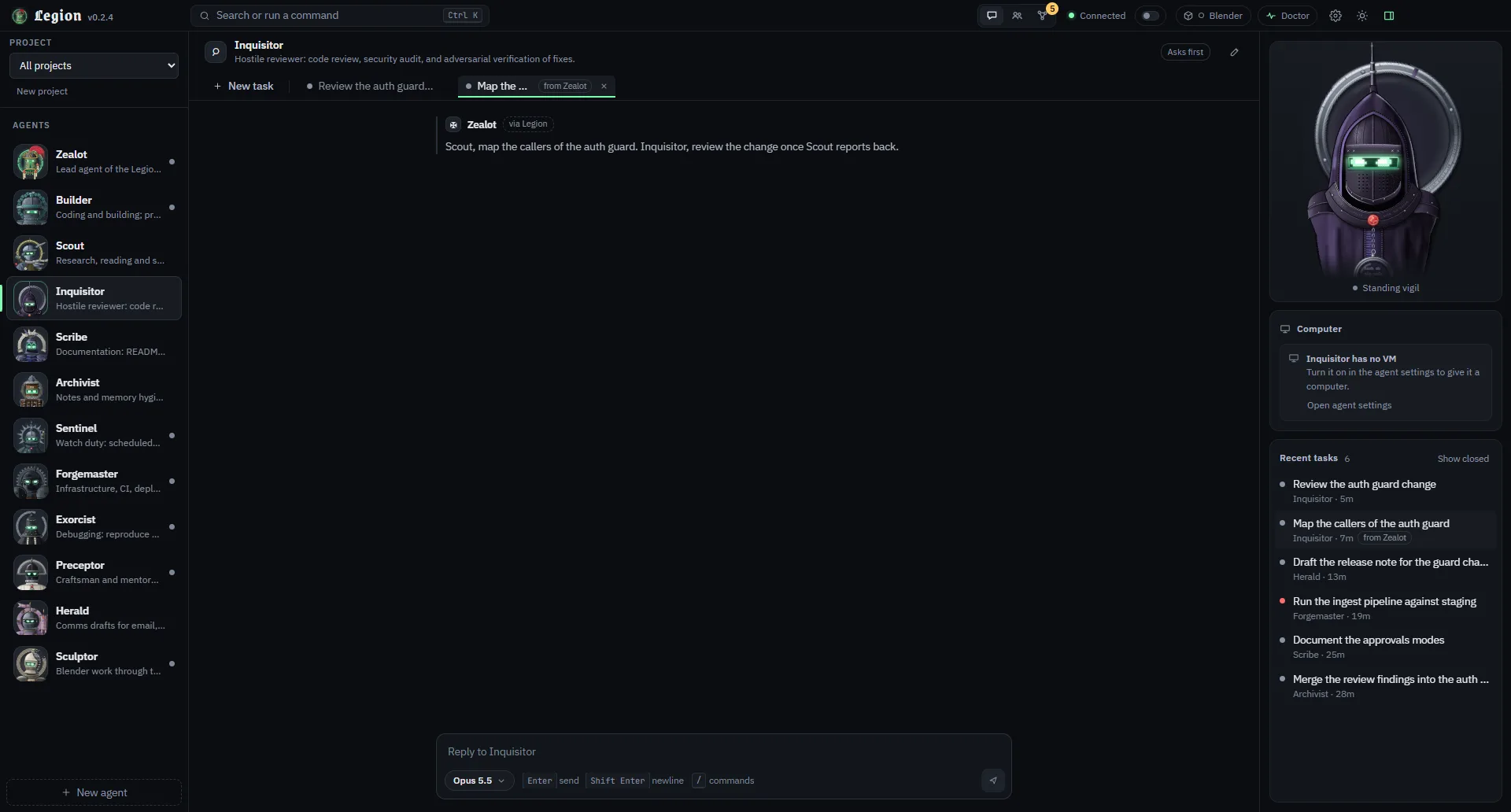
The lead hands work to the others, and a room puts several bots in one conversation with you.
Zealot has asked Scout and Inquisitor for work. The Relic is Executing, and the label under it names the hand-off.
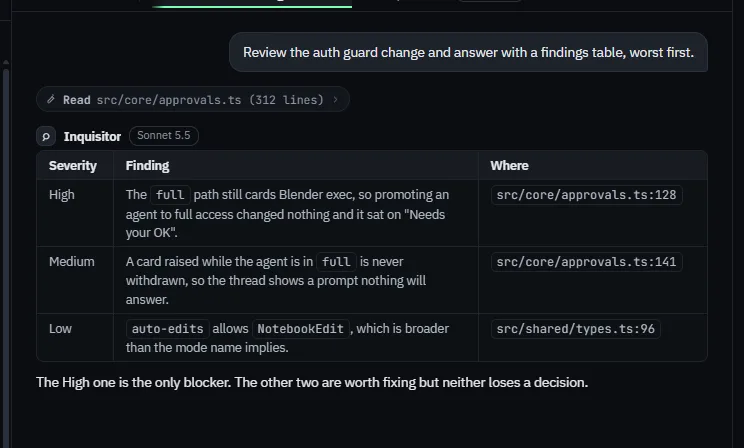
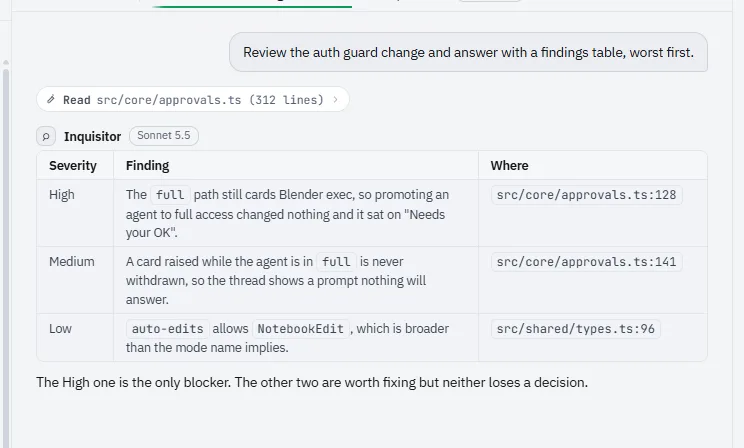
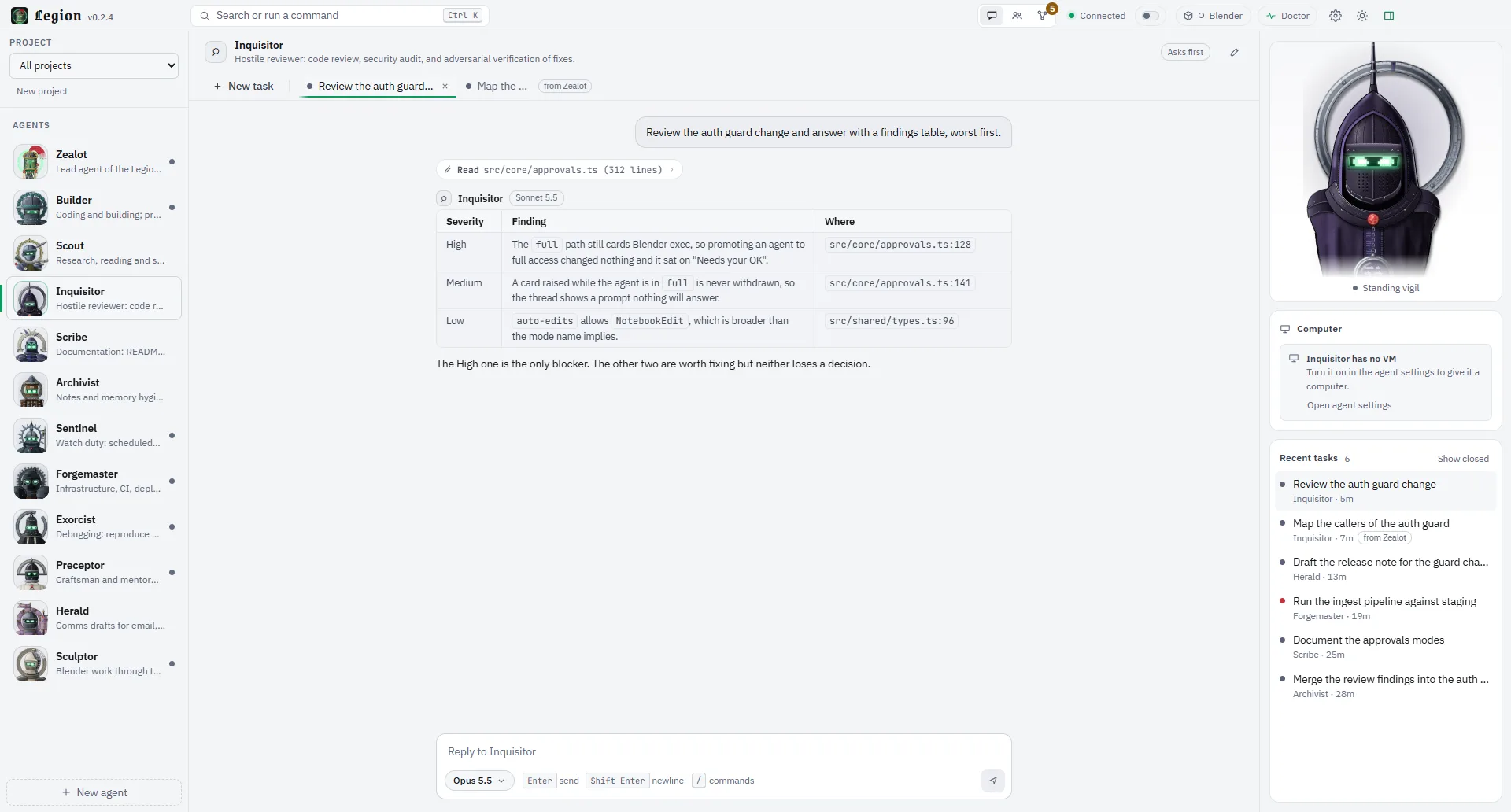
Inquisitor reviews a change and answers with a findings table, worst first. Light theme.
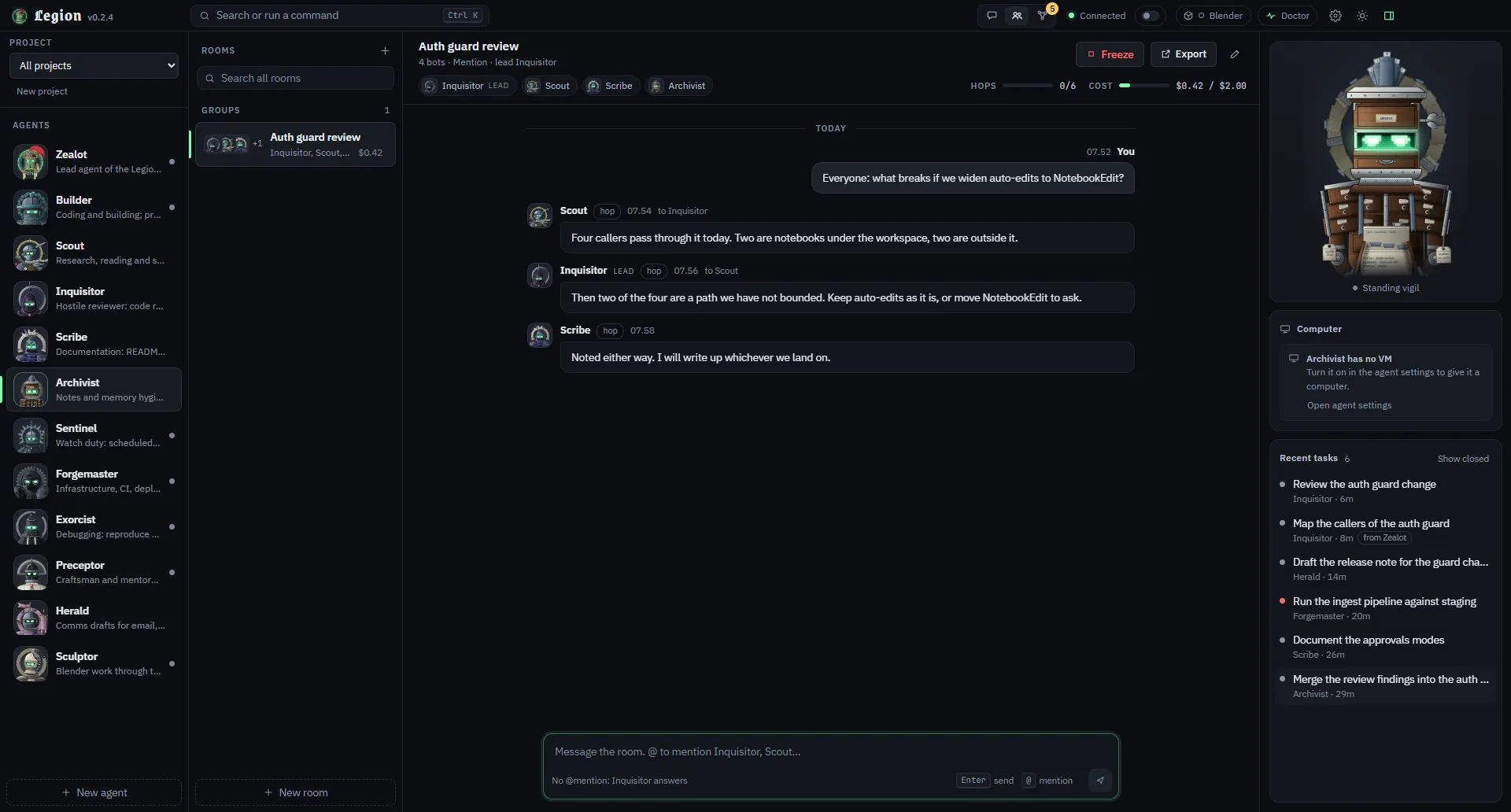
A room: four bots and you, a hop counter, a cost meter against its budget, and a Freeze button.
Every bot has a face, and a mood
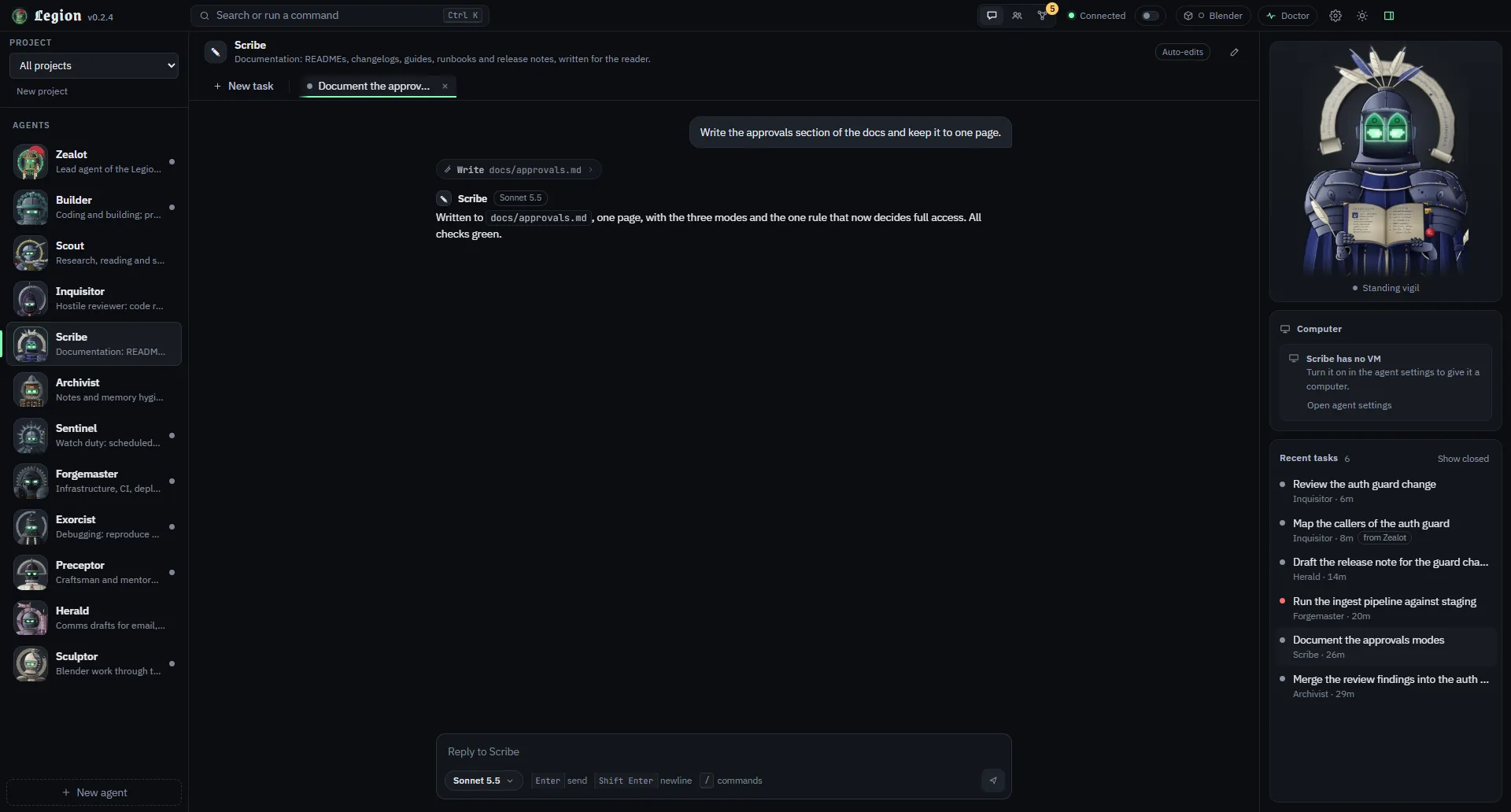
Each bust reacts to what its bot is doing: celebrating a finished task, wincing at a failure, standing by.
Scribe, just finished: Victory.
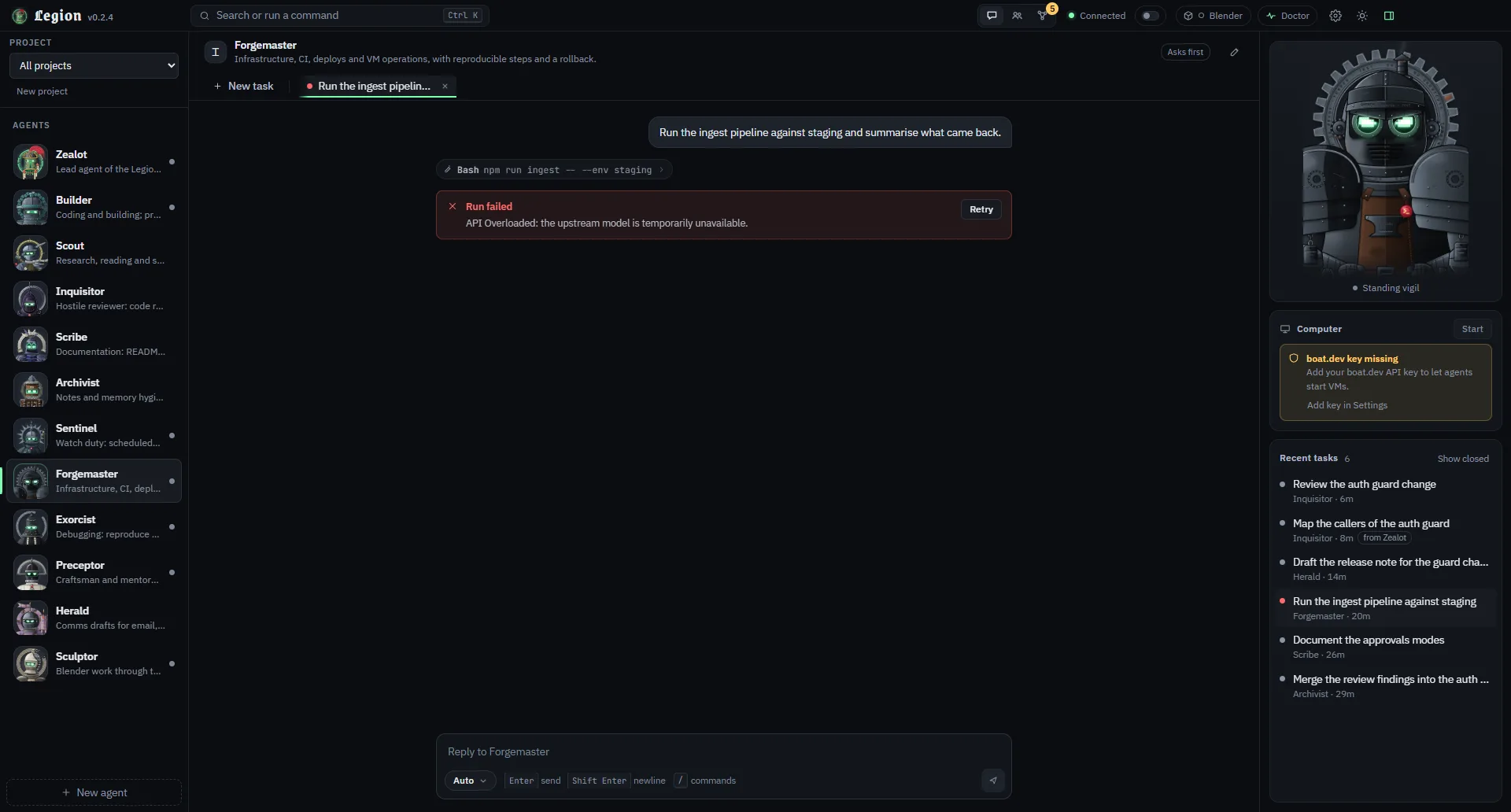
Forgemaster, after a failed run (here an API overload error): Fault detected, with the error and a Retry.
Herald is briefed to draft only, and says so in its reply.
Archivist flags and proposes merges; it does not delete Library notes.
It asks first
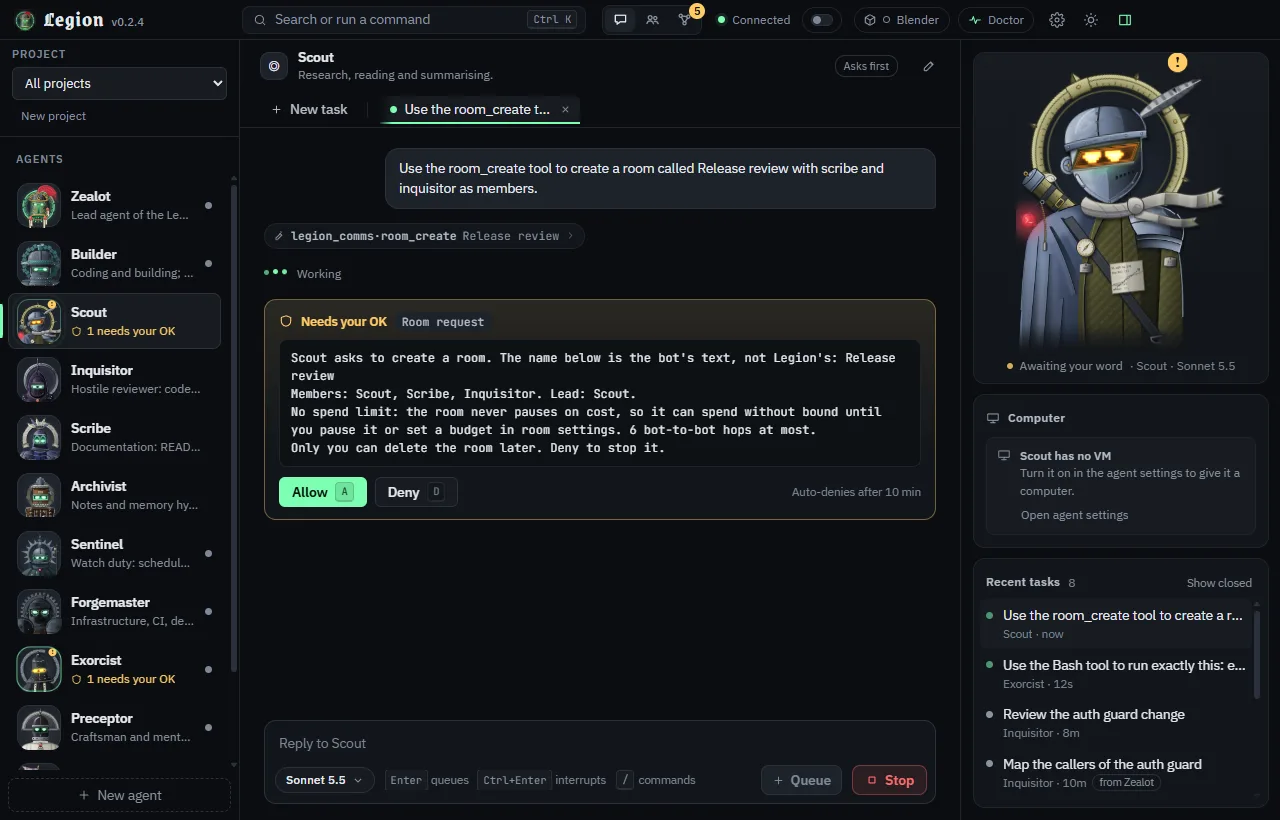
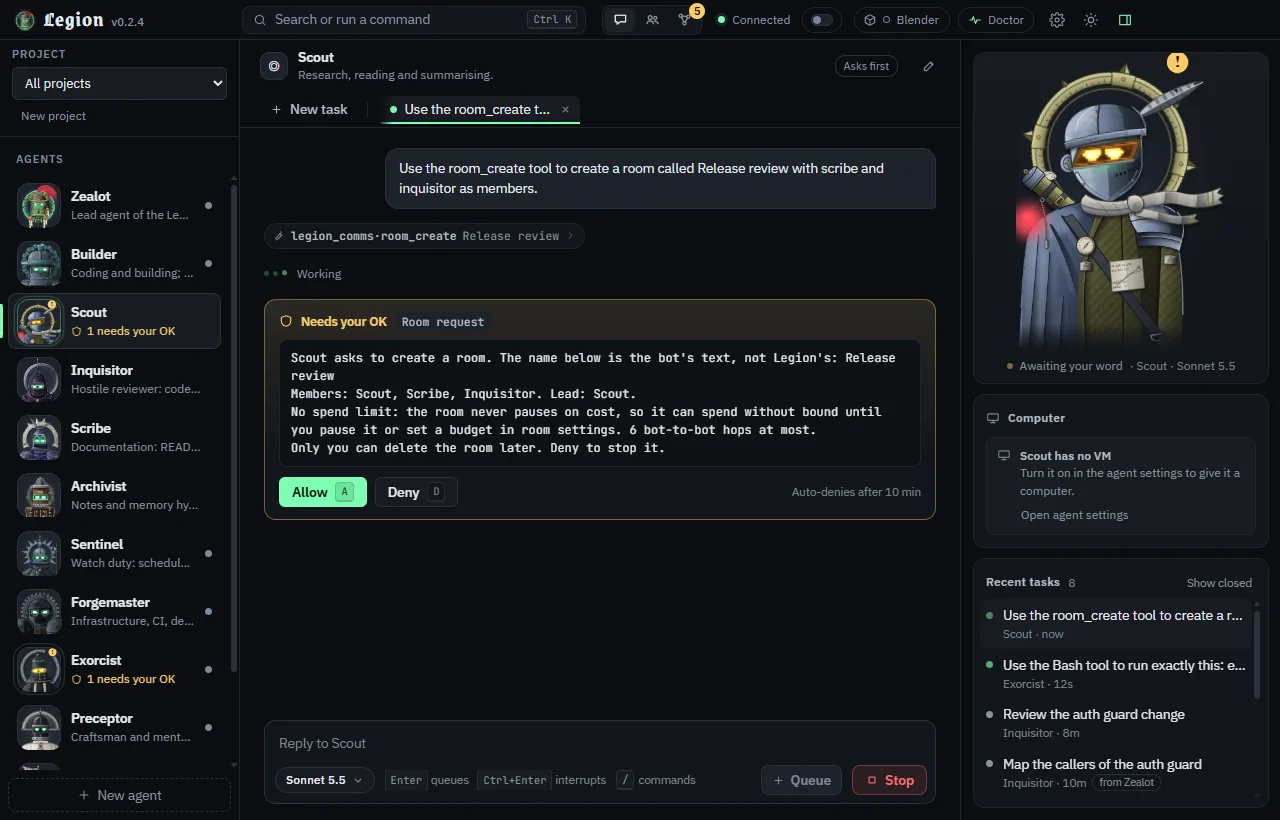
In ask and auto-edits modes, a risky call stops at a card only you can answer. A room is asked for too, so you see its ceiling before anything spends it. Full mode never asks, and Builder ships as full.
Exorcist wants to write a file. Nothing runs until you press Allow (A) or Deny (D), and it auto-denies after ten minutes.
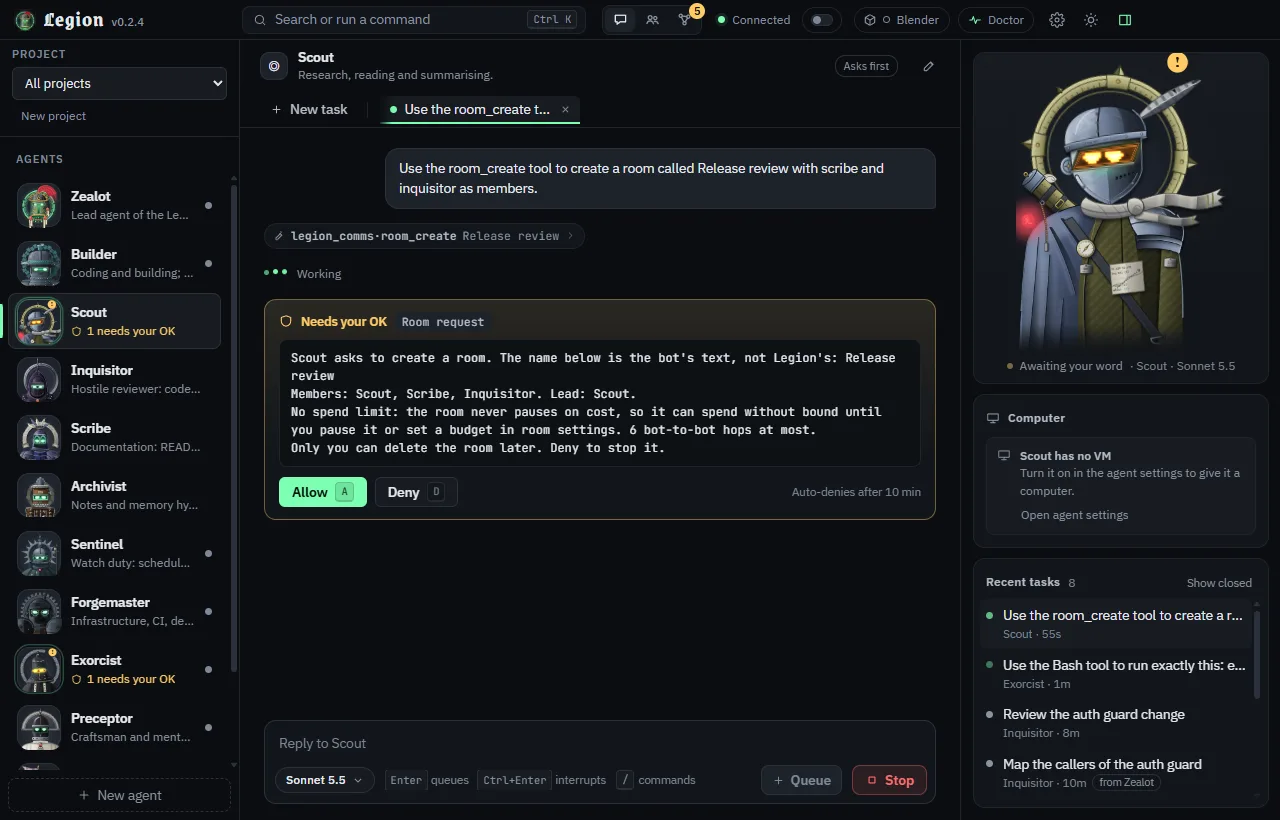
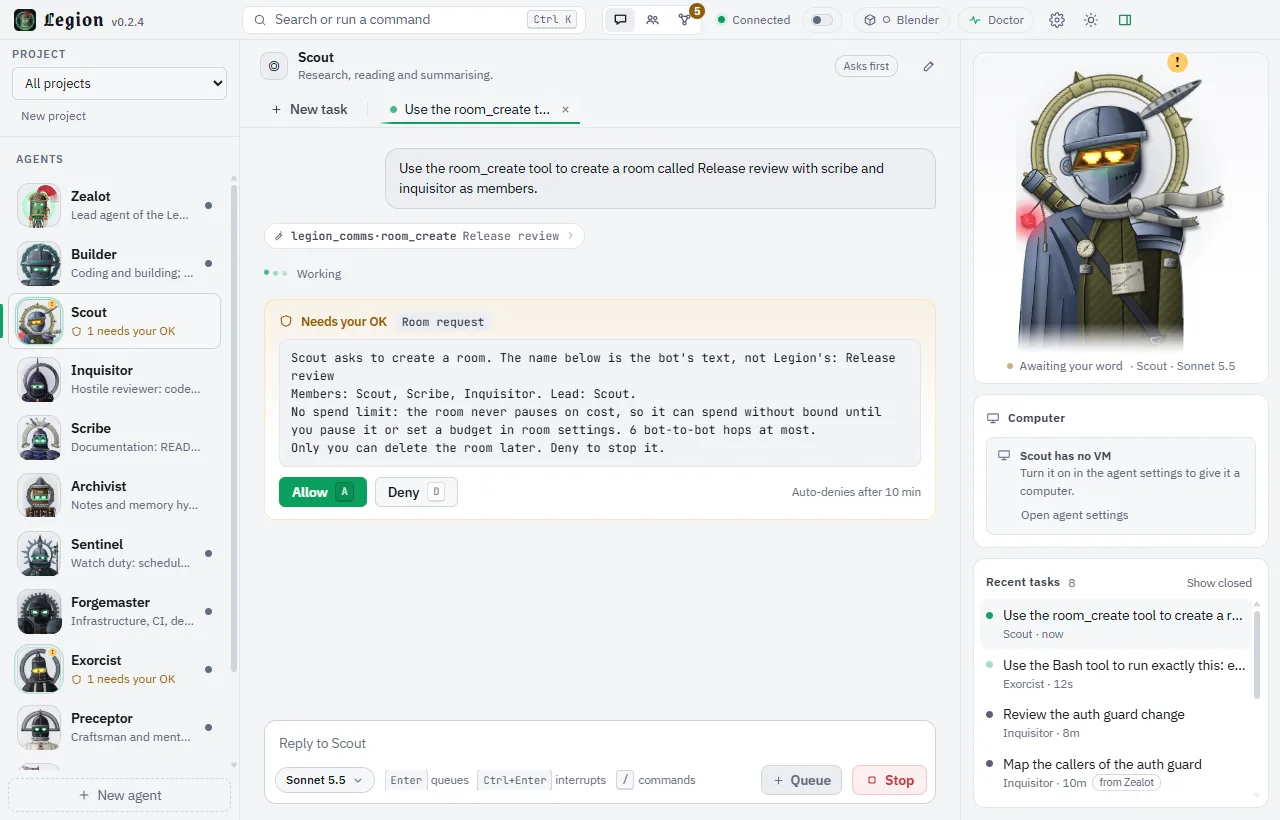
Scout asks to create a room. The card names the members and says plainly that there is no spend limit.
Memory you can audit
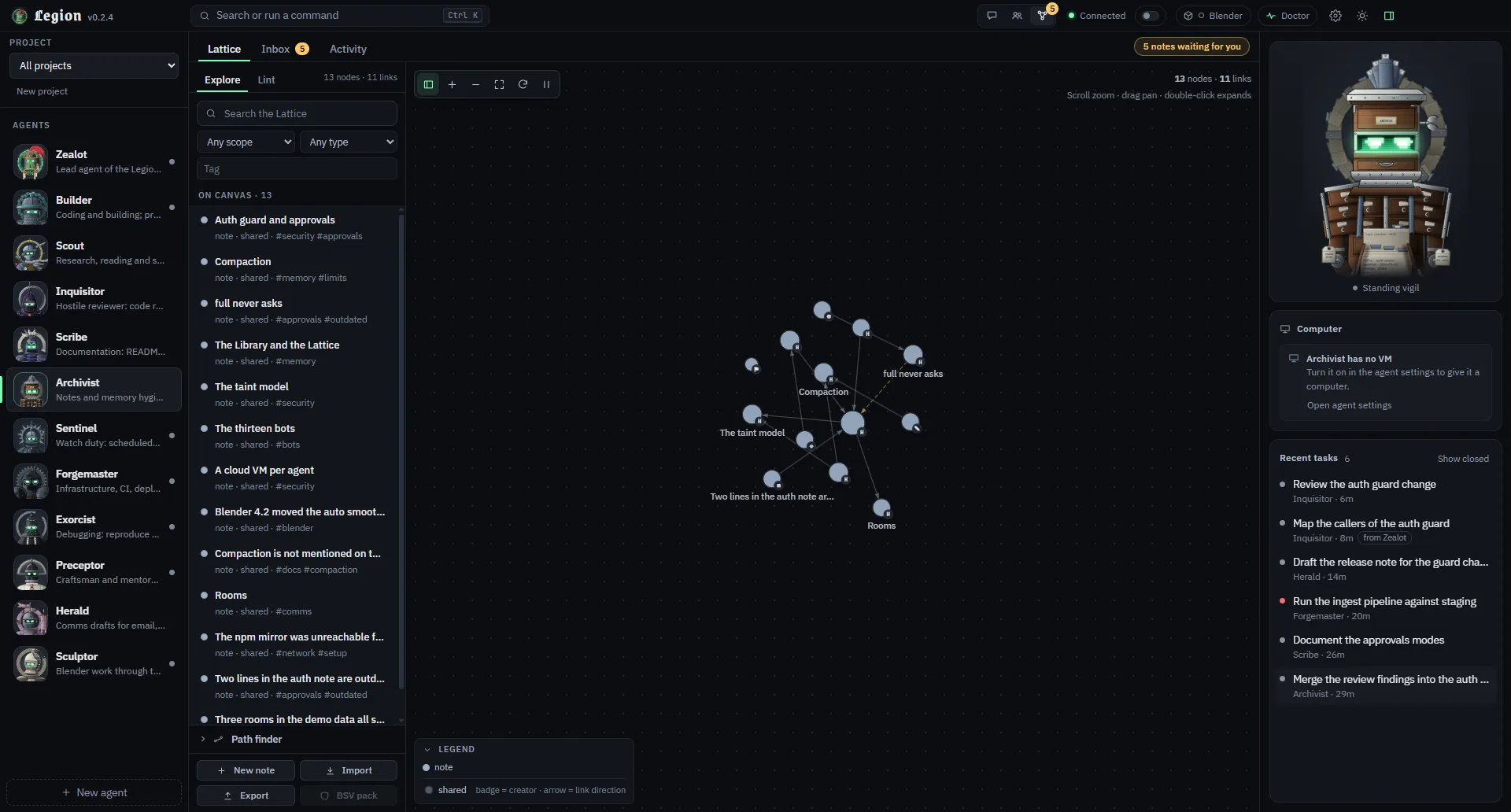
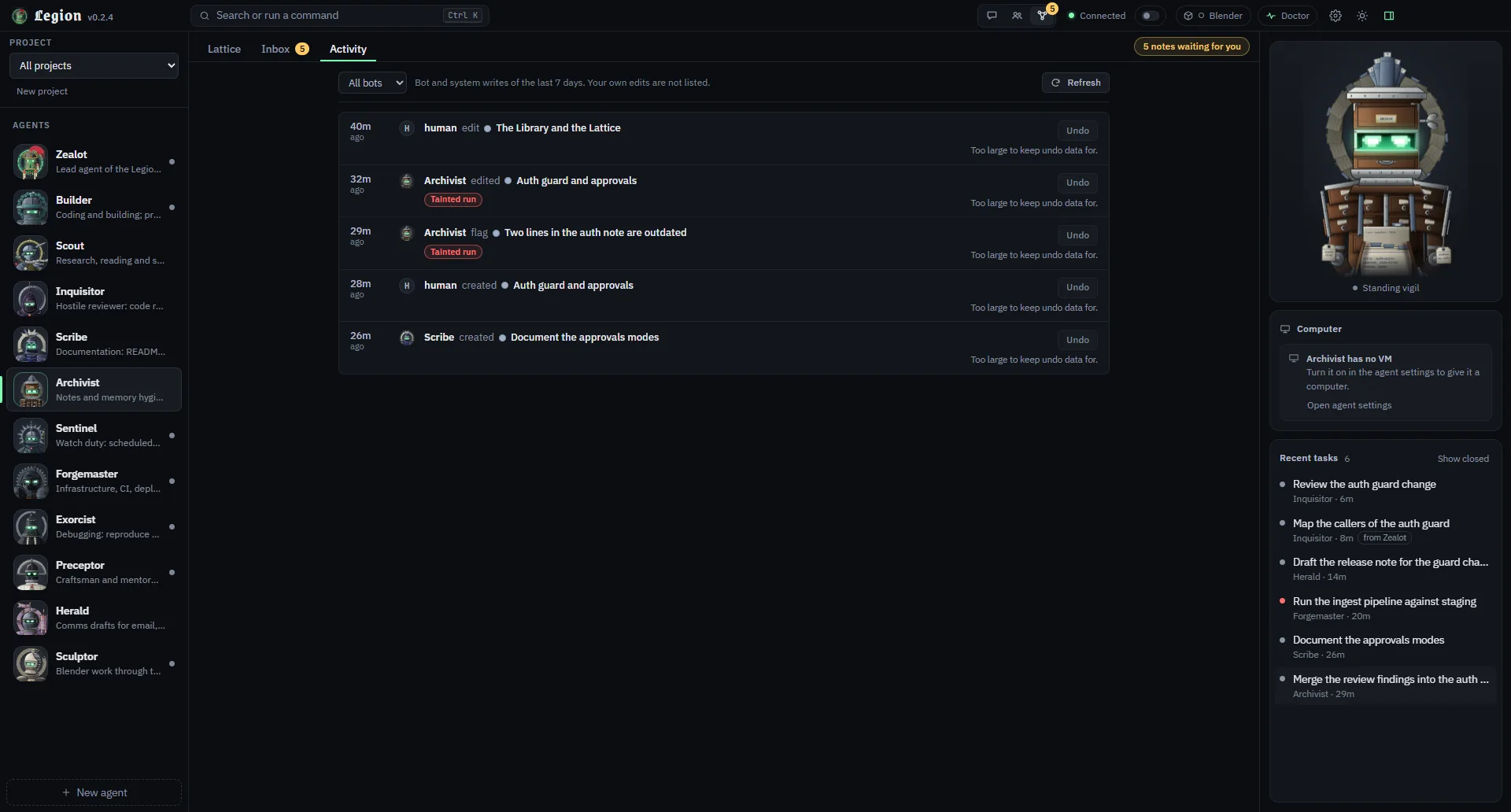
Bots keep long-term notes in a graph. What they write after touching outside content waits for you.
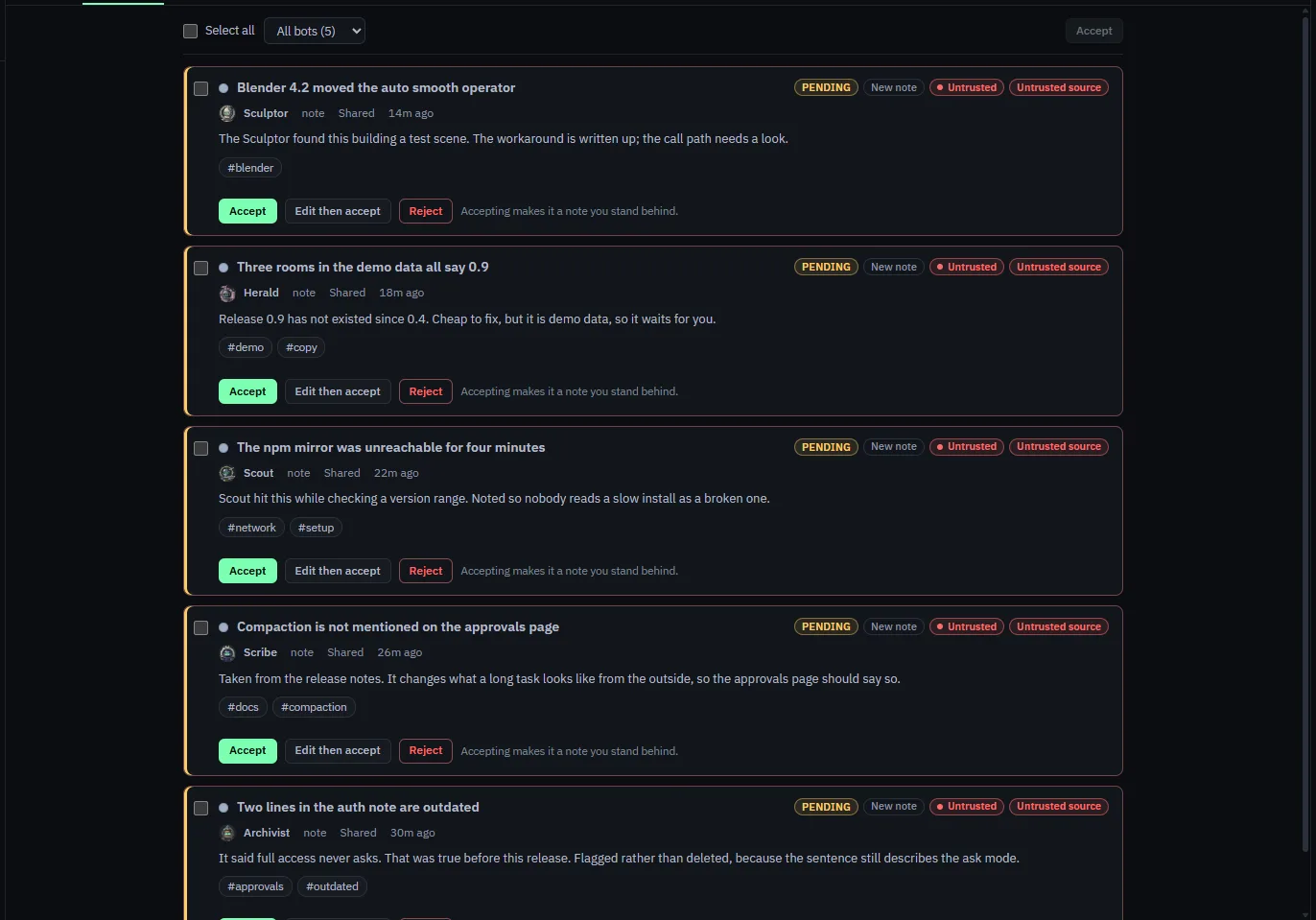
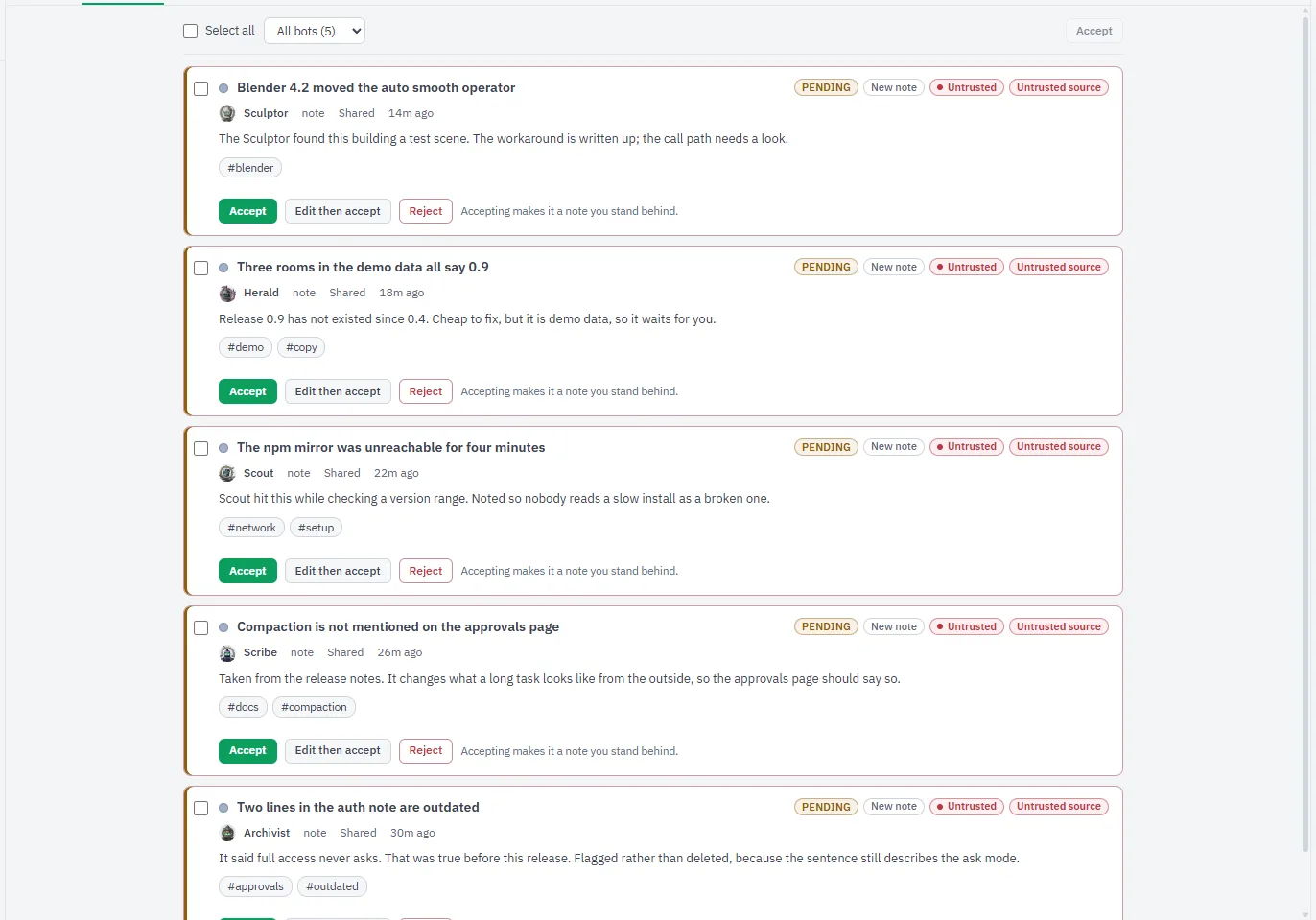
The Inbox: notes from bots, flagged Untrusted and Tainted run, wait to be accepted or rejected. Light theme.
The Lattice: the Library as a graph, with search, filters and a note list beside it.
Activity: recent bot and system writes, each with an Undo while it is still allowed. Light theme.
The amber "boat.dev key missing" card in the right-hand panel is what the Computer card says until you add a key. The model picker lists the models of the account the capture ran under. Both are shown as the app shows them. The capture ran on a different local port from the default 4747, so the port in a snippet may differ from the one on this page.
Status
Status: version 0.2.5-h
Betaexpect bugs · 0.2.5-h
What is built and tested, what is built, and what comes next.
Built and tested
Agents, approvals and the taint model, rooms, Projects, the project board, the Library and Lattice, MCP, the local-only core, the in-app updater, the prebuilt package, Blender and cloud VMs are built and covered by automated tests. The suite makes no network calls and no real Claude calls.
Built
The browser tool. A headless Edge or Chrome already on this computer, driven by Legion's own code, with its address checks, approval cards and taint. Optional and off by default.
The BSV spend tool. Testnet and mainnet capability. Mainnet is hard-off behind a switch you confirm natively, and a spend needs an Arm and the wallet's own prompt.
Next
A knowledge-graph audit button, scheduled Sentinel runs, and a lighter package.
Signed installers. Planned, with no release assigned.
Live runs. The BSV spend tool and the browser tool, exercised end to end on a real Windows PC. Neither has been yet.
Roadmap
In order. No dates, and none of it has shipped.
Live runs. The BSV spend tool and the browser tool, each exercised end to end on a real Windows PC instead of against stand-ins.
Then: a button in the knowledge graph that runs an audit agent to refresh stale notes from current docs, scheduled Sentinel runs, and an optional lighter package.
Signed installers. Planned, with no release assigned.
Instructions
Install
You need
A Claude sign-in or an API key. To sign in, run claude, then /login. A Claude subscription or an API key is required.
git, and Node.js 22.12 or newer. Setup can fetch Node itself, after it asks.
Windows 10 or 11 for the supported path. The installer is unsigned, so expect SmartScreen or antivirus prompts for .cmd files.
Optional: a boat.dev account and API key, for agent VMs.
One line
The quickest route. On Windows, in PowerShell:
irm https://getlegion.xyz | iex
On macOS or Linux, in a terminal:
curl -fsSL https://getlegion.xyz | sh
On Windows the script downloads the latest release from GitHub Releases over HTTPS, checks it against the release's SHA-256 and runs Legion's setup. The package is not code-signed, so SmartScreen may warn. On macOS and Linux you need git and Node.js 22.12 or newer. The script builds Legion from the release tag in ~/.local/share/legion and adds a legion command in ~/.local/bin. It needs no sudo. You can read both scripts before you run them: install.ps1 and install.sh. To skip the scripts, download the latest release by hand.
No Node, no Git
Every release publishes a prebuilt package for Windows x64: unpack it anywhere and run Legion.exe. It carries Electron, which has Node built in, and the Claude engine from the Agent SDK, so there is nothing to install first and you do not need Claude Code. Its SHA-256 is in the sums file beside it, and the release is signed. Once it is installed, Legion updates itself from inside the app.
With an AI agent
If you use a coding agent that can run commands, give it the address of this site and ask it to install Legion. It will find install.md, a plain-Markdown procedure written for agents: check that Node, git and Claude Code are present and ask you to confirm you are signed in, clone the source, show what setup would do, ask you before installing, then check that Legion starts and report what it saw. It is told not to touch your credentials, not to use admin rights and to stop and ask when a step fails. The same text is at llms.txt and llms-full.txt.
Windows, by hand
Open PowerShell and run the command from the top of this page. It clones the source and starts setup:
git clone https://github.com/dnh33/legion.git; cd legion; .\setup.cmd
Setup installs Legion for your user in %LOCALAPPDATA%\Programs\Legion. No admin rights are needed. It copies the source there, installs dependencies, builds the app and adds Legion shortcuts to the Desktop and Start menu. If you already have the source, double-click setup.cmd or run:
-DryRun shows what would happen without changing anything.
-Yes asks no questions: it stops a running Legion, installs and launches.
Run setup again from a newer source folder to update in place.
Launch from the shortcuts, or start-legion.cmd in the install folder. uninstall.cmd in the install folder removes the install and the shortcuts and keeps your data in %USERPROFILE%\.legion; add /purge to delete that too.
macOS and Linux
These work from a dev install:
git clone https://github.com/dnh33/legion.git
cd legion
npm ci
npm start          # builds, then opens the desktop app
npm run core runs the headless core alone, which is enough for the MCP integration.
For developers and contributors
Contributors and AI agents can test Legion without any real service: the source includes a test harness with stand-ins for the model, the wallet and Blender. It is a development tool, not part of what Legion does for you.
First run
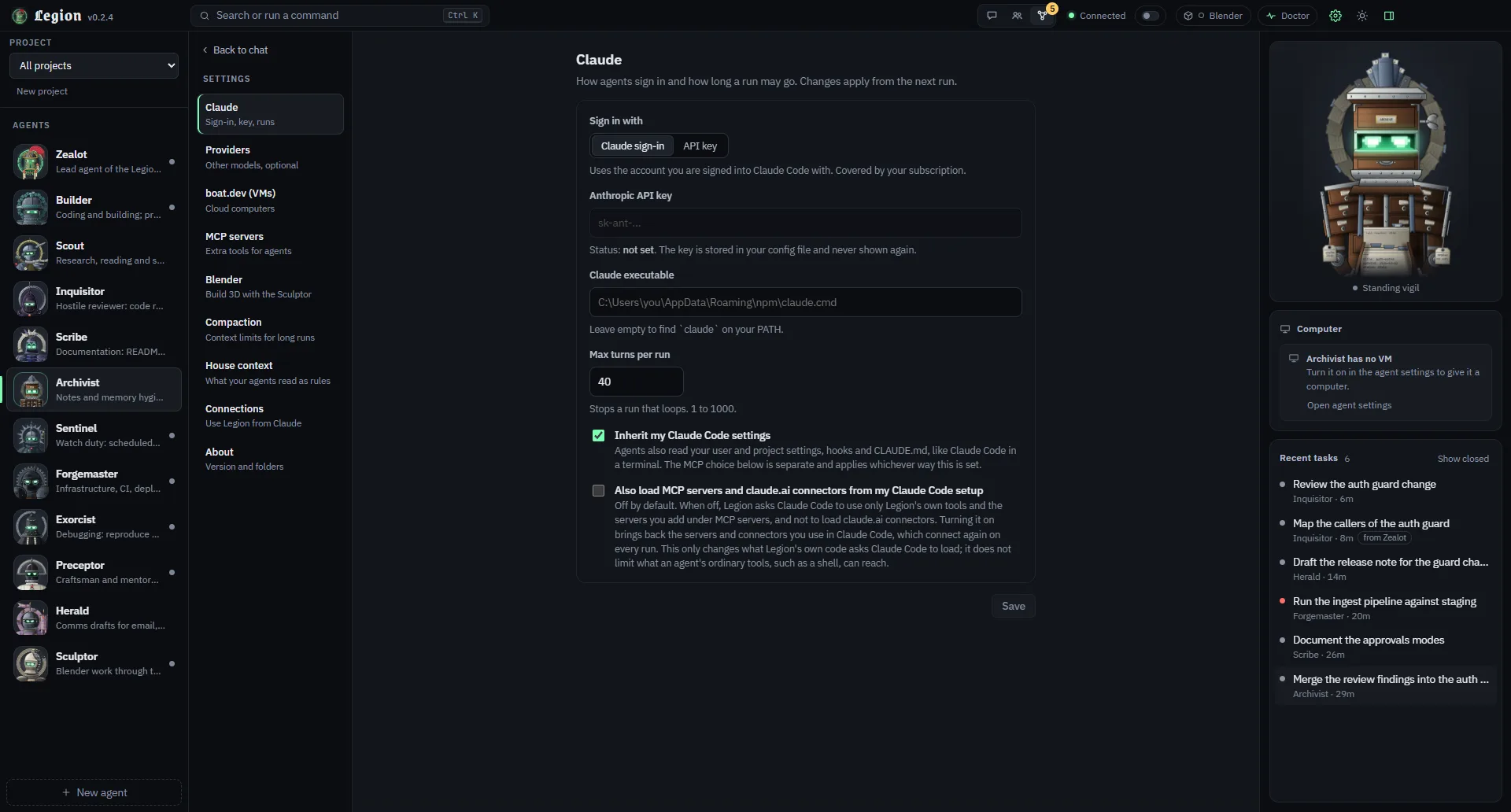
On first launch Legion creates config.json in its data folder with a fresh auth token. Open Doctor in the title bar, or type /doctor. It checks your Node version, config, Claude sign-in, boat.dev key and workspace folder, and tells you how to fix anything that fails. For agent VMs, create a boat.dev API key and put it in config.json as "boat": { "apiKey": "…" }, or set BOAT_API_KEY.
Not for Legion itself. You need a Claude sign-in (a subscription) or an API key. By default Legion uses the Claude account Claude Code is signed in to on your machine. To pay by API key, switch the setting and provide one.
Can it use ChatGPT, Codex or another model?
Yes, for OpenAI-compatible models. Claude stays the default and the full-featured path. OpenRouter ships and is on by default: add your own key and an agent can run any model through it. You can also add any other OpenAI-compatible endpoint you like, your own gateway or a local server. Those agents get Legion's own tools and the MCP servers you enable, not Claude Code's file, shell or web tools, and remember less on a continued task. OpenAI, Ollama and LM Studio are built into the core but shown in the app as next release. Codex and other command-line agents are not offered, because their own tools would run outside Legion's approval cards.
What is planned next?
The browser tool and the BSV spend tool are built but have not been run end to end on a real Windows PC. The project board, Blender, cloud VMs and the in-app updater are built and tested. What is not built yet: a button in the knowledge graph that runs an audit agent to refresh stale notes from current docs, scheduled Sentinel runs (nothing runs on a timer today), and an optional lighter package. Signed installers are planned, with no release assigned. Command-line agents such as Codex are not on the road: their own tools would run outside Legion's approval cards. No dates. See the roadmap under Status.
Can agents browse without a VM?
Yes. It uses the Edge or Chrome already on your PC, headless, driven by Legion's own code, so Legion's address checks, approval cards and taint rules apply. Optional and off by default. A local browser runs with your rights, so a cloud VM through boat.dev stays the only isolated way to browse. It is built and covered by tests against a stand-in browser, and it has not been tried on a real PC yet.
What are Projects?
A project groups tasks, rooms, notes and agents. It carries its own instructions, notes can be scoped to it, and only you control it. Claude Code and Cowork get read-only project tools over MCP. The project board, with work items in columns, is built and tested, and on by default.
Is Legion open source?
Yes. Apache 2.0, source public on GitHub.
What does it cost?
Legion itself is open source under the Apache 2.0 licence. Your Claude usage is billed under your own plan or API key, and Anthropic's terms say what your plan allows. VMs are optional, belong to boat.dev and cost money while they run; Legion stops idle ones after a set time.
What stops an agent running a shell command I did not expect?
It depends on the approval mode you pick. ask puts risky tool calls behind a card, full removes the prompts for that agent. Agents can run code on your machine, so use a VM for untrusted work. Legion's own checks do not stop a program that already runs as your user. The security policy lists the limits.
Does anything leave my computer?
Legion's state is files in your data folder. Your prompts go to Claude through the Agent SDK, as they would from Claude Code, and to boat.dev only if you turn on a VM for an agent. Tools you approve can reach further: a web fetch, or an MCP server you add, talks to whatever it is pointed at.
Can I host it for other people?
No. It is a personal tool for your own machine. Do not put it behind a shared endpoint or pass your subscription through it to someone else.
What is BSV mode?
An optional toggle, off by default. It shows the Assayer bot, loads a read-only knowledge pack (163 notes, 727 links) and can check a wallet on your computer. The read-only check has been run by hand against a real wallet once. The spend tool is built, with testnet and mainnet capability, and tested only against stand-in wallets: it has never spent from a real one. Mainnet is hard-off behind a switch you confirm natively, and a spend needs an Arm and the wallet's own prompt.
Does it work on macOS or Linux?
From a dev install, yes. Windows 10 and 11 are the primary target and the only place the setup script runs.